Skip to content
Creative Studio, runs on our GPU

Talk to AI with audio, image or video Runs on our GPU

Talk to AI with audio, an image or a video

Show it, play it, ask it. Send a recording, a picture or a short video and get a written or spoken answer.

Create

5 credits · about 5 min on our GPU with Image in · spoken answerQuickest: Short video in · text answer, 3 credits

What it does

Qwen2.5-Omni understands speech, images and short videos in one model. Ask a question about what you send and get the answer as text, or as text plus a spoken reply.

What you can do

2 real jobs, run on our GPU

Each example is a real run on our GPU: what went in, the exact instruction, and the result exactly as the model made it. Pick one to see it, then start from the same instruction.

Chart question, answered aloud
What went in
The input: Chart question, answered aloud

What we asked

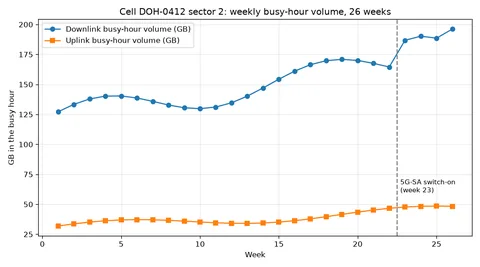
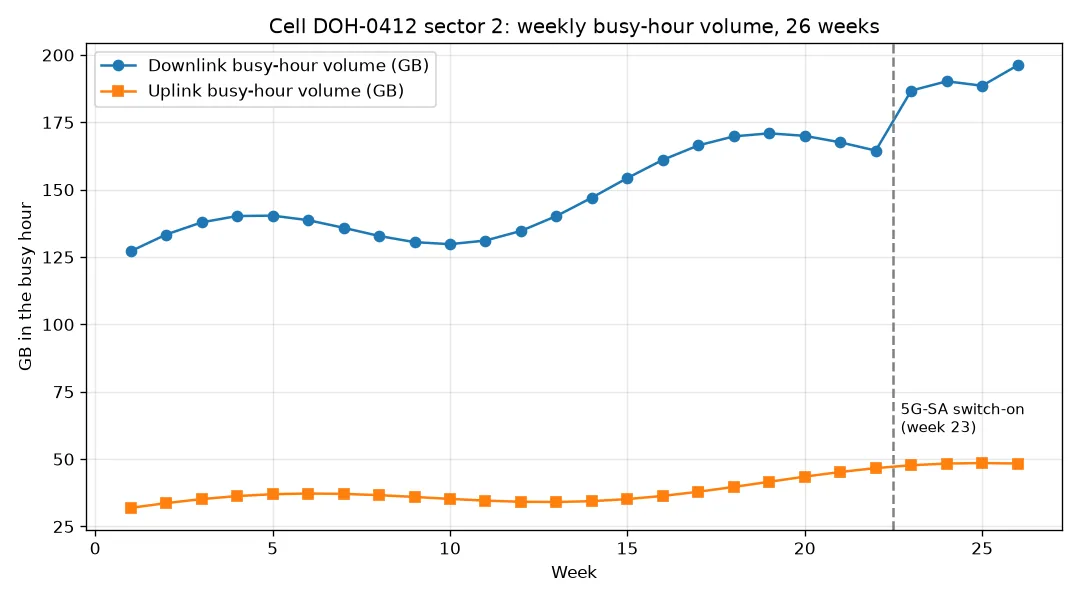
Look at this chart and tell me, as if speaking to a colleague, what changed around week 23 and what the peak downlink value is.

What came out, untouched

Well, around week 23, there was a big change. You see, the 5G - SA was switched on. And the peak downlink value? It's about 195 GB. If you have any more questions about this chart or anything else, feel free to ask.

4 min 11 s on our RTX 4060 5 credits ($0.50) · Image in · spoken answer
Describe a short video

What went in

A short video clip (play it under "Prompt and settings we used" in the gallery).

What we asked

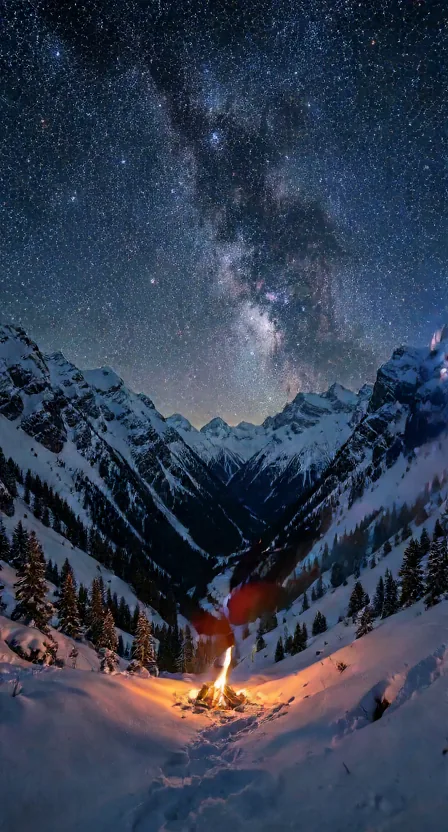
Describe this video in three sentences: the scene, the motion, and the mood.

What came out, untouched

The scene is a snowy mountain landscape at night, with a campfire glowing warmly in the foreground. The motion is subtle, with a person walking towards the fire, their silhouette visible against the bright flames. The mood is serene and peaceful, with the vast starry sky above and the snow-covered mountains creating a sense of tranquility. What do you think about this kind of scene?

1 min 24 s on our RTX 4060 3 credits ($0.30) · Short video in · text answer

Works well for

  • Transcribe a voice note and answer it
  • Spoken explanations of charts
  • Describing a short clip for captions
  • Hands-free answers for accessibility
  • Quick checks of what a video shows

Check before you rely on it

  • Slow on this 8 GB GPU (the model overflows the card): 2 to 17 minutes per answer.
  • Can invent details in videos.
  • Spoken replies use the model's built-in voice; no voice choice.

Get the best result

The prompt and the model decide the output; bigger models and settings cost more credits. These notes come from what worked, and what did not, in our runs.

Do

  • Ask one clear question ('what changed around week 23 and what is the peak?'): the chart answer got both right.
  • Keep videos short; it looks at 16 sampled frames.
  • Check video descriptions for invented details: it added a person who was not in the clip.
  • Choose Image in when a picture is enough: it is a third of the price of Audio in.

Avoid

  • Send recordings of other people without their permission.
  • Use it for long transcripts; the free Audio to Text tool is faster for that.

Cost, quality and time

Times are end to end on our GPU (an RTX 4060 Laptop GPU, 8 GB), model loading included, before any jobs ahead of yours. "Estimate" marks an option we have not measured yet.

OptionCreditsTypical timeSlowest seenWhat to expect
Image in · spoken answerRecommended54 min 51 s4 min 51 s1 runMeasured once: a chart question answered correctly, aloud, in 251 s plus 40 s load.
Short video in · text answer32 min 4 s2 min 4 s1 runMeasured once: 84 s plus 40 s load. Scene and mood right, but it invented a person walking.
Audio in · transcript and spoken answer1716 min 48 s16 min 48 s1 runMeasured once: transcript word for word, but slow: 972 s plus 36 s load (the model overflows the 8 GB card).

The settings, explained

Your filerequired
Image for 'Image in', a voice note for 'Audio in', a clip of up to about 10 s for 'Short video in'.Accepts: JPG, PNG, WEBP, WAV, MP3, MP4, up to 20 MB.
Your questionrequired
Accepts: 5-1000 characters.

Create

You answer for your prompt and your choice of model and settings; the safety filter still checks every job, and a refused prompt costs nothing.

Choose the model and quality
Describe what you want
Your file

Image for 'Image in', a voice note for 'Audio in', a clip of up to about 10 s for 'Short video in'.

5 creditsabout 5 min on our GPU, plus any jobs ahead

You'll have 7 days to download it; then it's deleted.

Results are kept 7 days. Credits come back only if the job fails or never starts.

The line right now

Reading the line…

Credits are held when you send a job and spent when the result is ready. They come back automatically if the job fails, is refused or has not started within 24 hours. Results are kept 7 days, or 48 hours after your first download, then deleted; a result that expires unused is not refunded. Pricing and refunds

Frequently asked questions

What can I send?

One image, one voice recording or one short video per job, with a question.

Why does audio cost more?

Our measured audio job took about 17 minutes of GPU time against 5 for an image.

Can it answer in a voice?

Yes, the image and audio options return a spoken reply as well as text.

Is it accurate?

Transcripts and chart answers were right in our trials; one video description invented a person. Check before relying on it.

Is it the same as Ask about an image?

Ask about an image is faster and cheaper for pictures; use this one for audio, video or a spoken answer.

More in the Creative Studio