Skip to content
Creative Studio, runs on our GPU

Screenshot helper Runs on our GPU

Screenshot helper: where do I click?

Where do I click? Find the button on a screenshot and get the exact point to click.

Create

1 credit · under a minute on our GPU

What it does

Upload a screenshot and say what you want to do. UI-TARS finds the right control and returns its pixel position, drawn on your screenshot, and can quote the text it sees there.

What you can do

3 real jobs, run on our GPU

Each example is a real run on our GPU: what went in, the exact instruction, and the result exactly as the model made it. Pick one to see it, then start from the same instruction.

Click Save in a desktop app

What went in

Only the instruction: no file.

What we asked

You are a GUI agent. Output the action to perform the task on this screenshot. Task: click the Save button. Reply in the form: Action: click(point='<point>x y</point>') with x,y in pixels of the screenshot.

What came out, untouched
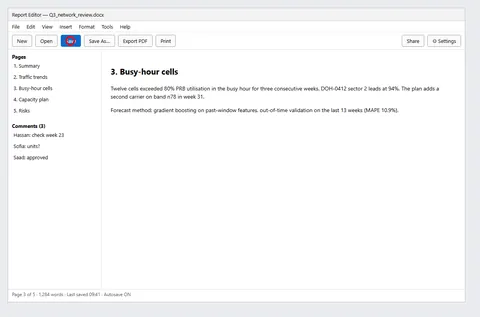
The result: Click Save in a desktop app
Action: click(point='(181,105)')

3 s on our RTX 4060 1 credit ($0.10) · One screenshot
Find PDF to Word on toolboxhere.com

What went in

Only the instruction: no file.

What we asked

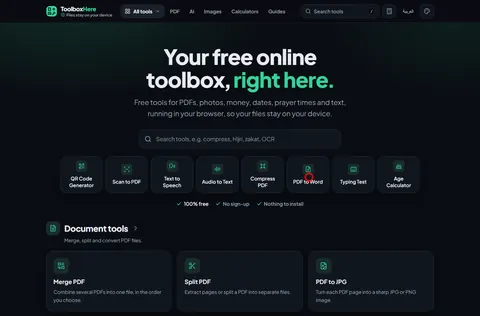
You are a GUI agent. The user wants to convert a PDF to a Word document on this website. Think step by step: which element do you click first, and what are the next two steps? Then give the first action as: Action: click(point='<point>x y</point>').

What came out, untouched

The result: Find PDF to Word on toolboxhere.com
Action: click(point='(879,504)')

2 s on our RTX 4060 1 credit ($0.10) · One screenshot
Phone page: main button and privacy line

What went in

Only the instruction: no file.

What we asked

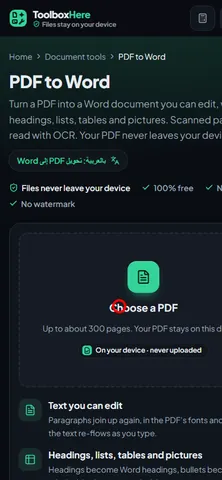
This is a phone screenshot of a web tool. 1) What is the page's main action button and where is it (x y)? 2) Is there a privacy or 'files never leave your device' statement visible? Quote it. 3) Output: Action: click(point='<point>x y</point>') for the main action button.

What came out, untouched

The result: Phone page: main button and privacy line
1. The main action button is 'Choose a PDF' and it is located at the center of the page, slightly below the middle.
2. Yes, there is a privacy statement visible on the page. It states: 'Files never leave your device' and 'No watermark'.
3. The action button is 'Choose a PDF' and the coordinates are approximately (209,538).

4 s on our RTX 4060 1 credit ($0.10) · One screenshot

Works well for

  • Help guides with marked screenshots
  • Finding a setting in a crowded app
  • Testing that a page's main button is findable
  • Planning click-by-click instructions
  • Checking phone layouts for small targets

Check before you rely on it

  • Gives the next click, not a full multi-step plan.
  • Does not control your computer; it only marks the screenshot.
  • One screenshot per job.

Get the best result

The prompt and the model decide the output; bigger models and settings cost more credits. These notes come from what worked, and what did not, in our runs.

Do

  • Name the goal in plain words ('click Save', 'convert a PDF to Word'): all three trials hit the right control.
  • Upload the screenshot at its real size; the click point is in its pixels.
  • Ask it to quote what it sees when you need text: it quoted the privacy line word for word.

Avoid

  • Expect a long step-by-step plan: asked for three steps, it returned only the first click.
  • Upload screenshots with passwords or personal data.

Cost, quality and time

Times are end to end on our GPU (an RTX 4060 Laptop GPU, 8 GB), model loading included, before any jobs ahead of yours. "Estimate" marks an option we have not measured yet.

OptionCreditsTypical timeSlowest seenWhat to expect
One screenshotRecommended149 s50 s3 runsMeasured: 2.2-3.6 s per answer plus 46 s model load.

The settings, explained

Picturerequired
Accepts: PNG, JPG, WEBP, up to 8 MB.
What do you want to do?required
e.g. 'click Save' or 'convert this PDF to Word'.Accepts: 5-500 characters.

Create

You answer for your prompt and your choice of model and settings; the safety filter still checks every job, and a refused prompt costs nothing.

What you get
Describe what you want
Picture

e.g. 'click Save' or 'convert this PDF to Word'.

1 creditunder a minute on our GPU, plus any jobs ahead

You'll have 7 days to download it; then it's deleted.

Results are kept 7 days. Credits come back only if the job fails or never starts.

The line right now

Reading the line…

Credits are held when you send a job and spent when the result is ready. They come back automatically if the job fails, is refused or has not started within 24 hours. Results are kept 7 days, or 48 hours after your first download, then deleted; a result that expires unused is not refunded. Pricing and refunds

Frequently asked questions

Does it click for me?

No. It tells you and shows you where to click on your screenshot.

Does it work on phone screenshots?

Yes; the phone trial found the main button and quoted the privacy line correctly.

How precise is it?

In our trials the point landed on the right button every time.

Is my screenshot kept?

At most 7 days, then deleted. Avoid screenshots with private data.

What do I get back?

The click point as JSON and your screenshot with the point marked.

More in the Creative Studio